
现在Visual Studio2019升级到最新,就可以创建.NET5的项目了
直接选择ASP.NET Core Web应用程序,ASP.NET Core 5.0的版本。
创建好之后,我们加入以下配置项
{
  "Logging": {
    "LogLevel": {
      "Default": "Information",
      "Microsoft": "Warning",
      "Microsoft.Hosting.Lifetime": "Information"
    }
  },
  "AllowedHosts": "*",
  "JWTSetting": {
    "JWTIssuer": "JwtDemoApi", //JWT配置 签发者
    "JWTAudience": "JwtDemoApi", //JWT配置 接受者
    "JWTExpires": "30", //JWT配置 过期天数
    "JWTKey": "bc47a26eb9a59406057dddd62d0898f4" //JWT配置
  }
}
每个类的功能介绍:
1、BaseController:这是基础控制器,可能会有公共方法,其他控制器继承他。
2、AuthController:登录接口在里面。
3、MemberController:其他需要授权的才能访问的接口在里面。
4、ConfigHelper:封装一个读取配置项的辅助类。
5、GetLoginDto:登录入参。
6、LoginDto:登录回参。
7、JwtUserInfo:ToKen中带的用户信息。
8、JwtHelper:颁发Token的辅助类。
引用一下依赖项:
1、Microsoft.AspNetCore.Authentication.JwtBearer
2、Microsoft.AspNetCore.Mvc.NewtonsoftJson
3、Swashbuckle.AspNetCore
4、Swashbuckle.AspNetCore.Filters
发现StartUp.cs里面自带Swagger,不过我们得改下,最终改成下面这样:
using Microsoft.AspNetCore.Authentication.JwtBearer;
using Microsoft.AspNetCore.Builder;
using Microsoft.AspNetCore.Hosting;
using Microsoft.Extensions.Configuration;
using Microsoft.Extensions.DependencyInjection;
using Microsoft.Extensions.Hosting;
using Microsoft.IdentityModel.Tokens;
using Microsoft.OpenApi.Models;
using Newtonsoft.Json;
using Newtonsoft.Json.Serialization;
using Swashbuckle.AspNetCore.Filters;
using System;
using System.IO;
using System.Text;

namespace JwtDemoApi
{
    public class Startup
    {
        private readonly IConfiguration _configuration;

        /// <summary>
        /// Initializes a new instance of the <see cref="Startup"/> class.
        /// </summary>
        /// <param name="configuration">The configuration.</param>
        public Startup(IConfiguration configuration)
        {
            _configuration = configuration;
        }

        /// <summary>
        /// Configures the services.
        /// </summary>
        /// <param name="services">The services.</param>
        public void ConfigureServices(IServiceCollection services)
        {
            services.AddControllers();
            //配置跨域
            services.AddCors(options => options.AddPolicy("any", builder => builder
                .WithOrigins("*")
                .AllowAnyHeader()
                .AllowAnyMethod()
                .AllowAnyOrigin()));
            //swagger配置
            services.AddSwaggerGen(c =>
            {
                //配置swagge版本显示信息
                c.SwaggerDoc("v1", new OpenApiInfo { Title = "JwtDemoApi", Version = "v1", Description = "API描述信息" });
                //把xml文件都加进去
                foreach (var item in Directory.GetFiles(AppDomain.CurrentDomain.BaseDirectory, "*.xml"))
                {
                    c.IncludeXmlComments(item, true);
                }
                //添加引用 Swashbuckle.AspNetCore.Filters
                c.OperationFilter<AddResponseHeadersFilter>();
                c.OperationFilter<AppendAuthorizeToSummaryOperationFilter>();
                c.OperationFilter<SecurityRequirementsOperationFilter>();
                //添加请求头配置
                c.AddSecurityDefinition("oauth2", new OpenApiSecurityScheme()
                {
                    Description = "在下框中输入请求头中需要添加Jwt授权Token:Bearer Token",
                    Name = "Authorization",
                    In = ParameterLocation.Header,
                    Type = SecuritySchemeType.Http,
                    BearerFormat = "JWT",
                    Scheme = "Bearer"
                });
            });

            //配置认证服务
            //引用Microsoft.AspNetCore.Authentication.JwtBearer
            services.AddAuthentication(x =>
            {
                x.DefaultAuthenticateScheme = JwtBearerDefaults.AuthenticationScheme;
                x.DefaultChallengeScheme = JwtBearerDefaults.AuthenticationScheme;
            }).AddJwtBearer(o =>
            {
                o.TokenValidationParameters = new TokenValidationParameters
                {
                    //是否验证发行人
                    ValidateIssuer = true,
                    ValidateAudience = true,
                    ValidateIssuerSigningKey = true,
                    ValidateLifetime = true, //验证生命周期
                    ValidIssuer = _configuration.GetSection("JWTSetting").GetSection("JWTIssuer").Value,//发行人
                    ValidAudience = _configuration.GetSection("JWTSetting").GetSection("JWTAudience").Value,//受众人
                    IssuerSigningKey = new SymmetricSecurityKey(Encoding.ASCII.GetBytes(_configuration.GetSection("JWTSetting").GetSection("JWTKey").Value)),
                    ClockSkew = TimeSpan.Zero,//缓冲时间
                };
            });
            //配置序列化 引用Microsoft.AspNetCore.Mvc.NewtonsoftJson
            services.AddControllers().AddNewtonsoftJson(setup =>
            {
                setup.SerializerSettings.ContractResolver = new CamelCasePropertyNamesContractResolver();//驼峰命名返回
                setup.SerializerSettings.ReferenceLoopHandling = ReferenceLoopHandling.Ignore; //忽略循环引用
                setup.SerializerSettings.DateFormatString = "yyyy-MM-dd HH:mm:ss"; //默认日期格式化
            });

        }

        /// <summary>
        /// Configures the specified application.
        /// </summary>
        /// <param name="app">The application.</param>
        /// <param name="env">The env.</param>
        public void Configure(IApplicationBuilder app, IWebHostEnvironment env)
        {
            if (env.IsDevelopment())
            {
                app.UseDeveloperExceptionPage();
                app.UseSwagger();
                app.UseSwaggerUI(c => c.SwaggerEndpoint("/swagger/v1/swagger.json", "JwtDemoApi v1"));
            }

            app.UseRouting();

            app.UseAuthentication();
            app.UseAuthorization();

            app.UseEndpoints(endpoints =>
            {
                endpoints.MapControllers();
            });
        }
    }
}
这里swagger配置,有个注意点,jwt的Token我们采用Bearer这种方式,希望在Swagger请求自动带上Bearer前缀,那么SecuritySchemeType.Http这一句就至关重要。
本文例子打算创建两个控制器,一个负责登录,一个是其他业务接口,需要登录之后才能调用的。
开始看第一个控制器BaseController,这个控制器可能是有公用方法,所以里面的方法标识了,不是接口,忽略特性
[ApiExplorerSettings(IgnoreApi = true)]
using JwtDemoApi.Models;
using Microsoft.AspNetCore.Authorization;
using Microsoft.AspNetCore.Http;
using Microsoft.AspNetCore.Mvc;
using System;
using System.Collections.Generic;
using System.IdentityModel.Tokens.Jwt;
using System.Linq;
using System.Security.Claims;

namespace JwtDemoApi.Controllers
{
    /// <summary>
    /// BaseController
    /// </summary>
    public class BaseController : ControllerBase
    {
        /// <summary>
        /// 从JwtToken获取用户信息
        /// </summary>
        /// <returns></returns>
        [ApiExplorerSettings(IgnoreApi = true)]//忽略
        [Authorize]
        public JwtUserInfo GetUseByJwtToken()
        {
            try
            {
                string token = HttpContext.Request.Headers["Authorization"].ToString().Replace("Bearer", "").Trim();
                IEnumerable<Claim> clims = new JwtSecurityToken(token).Claims;
                return new JwtUserInfo()
                {
                    Id = clims.FirstOrDefault(z => z.Type == nameof(JwtUserInfo.Id))?.Value ?? "",
                    UserName = clims.FirstOrDefault(z => z.Type == nameof(JwtUserInfo.UserName))?.Value ?? "",
                    Mobile = clims.FirstOrDefault(z => z.Type == nameof(JwtUserInfo.Mobile))?.Value ?? "",
                    WxNickName = clims.FirstOrDefault(z => z.Type == nameof(JwtUserInfo.WxNickName))?.Value ?? "",
                };
            }
            catch (Exception ex)
            {
                return null;
            }
        }
    }
}
再看AuthController控制器,这里面只有登录接口
using JwtDemoApi.Models;
using Microsoft.AspNetCore.Mvc;
using System;
using System.Collections.Generic;
using System.Security.Claims;
using System.Threading.Tasks;

namespace JwtDemoApi.Controllers
{
    /// <summary>
    /// 授权控制器
    /// </summary>
    [Route("api/[controller]")]
    [ApiController]
    public class AuthController : BaseController
    {
        /// <summary>
        ///登录获取Token
        /// </summary>
        /// <param name="model">The model.</param>
        /// <returns></returns>
        [HttpPost("Login")]
        public async Task<LoginDto> LoginAsync([FromBody] GetLoginDto model)
        {
            //TODO 数据库相关操作逻辑

            #region 组织jwt信息
            //组装jwt信息
            IEnumerable<Claim> claims = new Claim[] {
                new Claim(nameof(JwtUserInfo.UserName),"杨富贵"),
                new Claim(nameof(JwtUserInfo.WxNickName),"CarsonYang"),
                new Claim(nameof(JwtUserInfo.Mobile),"158****2846"),
                new Claim(nameof(JwtUserInfo.Id),"1"),
            };
            #endregion

            LoginDto retdata = new LoginDto
            {
                IsSucceed = true,
                Message = "登录成功",
                Token = JwtHelper.BuildJwtToken(claims),
                Expired = JwtHelper.GetTimeStamp(DateTime.UtcNow.AddDays(ConfigHelper.GetConfigToInt("JWTSetting:JWTExpires"))).ToString()
            };

            return retdata;
        }
    }
}
再看MemberController控制器,这个控制器里面的接口就需要登录之后才能操作了。
using JwtDemoApi.Models;
using Microsoft.AspNetCore.Authorization;
using Microsoft.AspNetCore.Mvc;
using System.Threading.Tasks;

namespace JwtDemoApi.Controllers
{
    /// <summary>
    /// 授权控制器
    /// </summary>
    [Route("api/[controller]")]
    [ApiController]
    public class MemberController : BaseController
    {
        /// <summary>
        ///获取用户信息
        /// </summary>
        /// <param name="model">The model.</param>
        /// <returns></returns>
        [HttpPost("GetUserInfo")]
        [Authorize]
        public async Task<JwtUserInfo> GetUserInfoAsync([FromBody] GetLoginDto model)
        {
            //获取到登录人信息
            JwtUserInfo user = GetUseByJwtToken();
            //TODO 业务逻辑
            return user;
        }
    }
}
注意看多了个授权特性:
[Authorize]
接下来就是把其他辅助类和DTO写一下:
ConfigHelper.cs
using Microsoft.Extensions.Configuration;
using System;

namespace JwtDemoApi.Models
{
    public class ConfigHelper
    {
        /// <summary>
        /// The configuration
        /// </summary>
        private static IConfigurationRoot _configuration;

        /// <summary>
        /// Initializes a new instance of the <see cref="ConfigHelper"/> class.
        /// </summary>
        public ConfigHelper()
        {
            if (_configuration == null)
            {
                IConfigurationBuilder builder = new ConfigurationBuilder().AddJsonFile("appsettings.json");
                _configuration = builder.Build();
            }
        }

        /// <summary>
        /// Gets the configuration.
        /// </summary>
        /// <param name="key">The key.</param>
        /// <returns></returns>
        public string GetConfig(string key)
        {
            return _configuration[key];
        }

        /// <summary>
        ///获取字符串配置
        /// </summary>
        /// <param name="key">The key.</param>
        /// <returns></returns>
        public static string GetConfigToString(string key)
        {
            try
            {
                return new ConfigHelper().GetConfig(key);
            }
            catch
            {
                return "";
            }
        }
        /// <summary>
        /// 查询配置,返回整数
        /// </summary>
        /// <param name="key">键名</param>
        /// <returns></returns>
        public static int GetConfigToInt(string key)
        {
            try
            {
                string configValue = new ConfigHelper().GetConfig(key);
                if (configValue == null)
                {
                    return int.MinValue;
                }
                return Convert.ToInt32(configValue);
            }
            catch
            {
                return int.MinValue;
            }
        }
        /// <summary>
        /// 查询配置,返回整数
        /// </summary>
        /// <param name="key">键名</param>
        /// <returns></returns>
        public static bool GetConfigToBool(string key)
        {
            try
            {
                string configValue = new ConfigHelper().GetConfig(key);
                if (configValue == null)
                {
                    return false;
                }
                return Convert.ToBoolean(configValue);
            }
            catch
            {
                return false;
            }
        }
    }
}
GetLoginDto.cs
namespace JwtDemoApi.Models
{
    /// <summary>
    /// 登录入参
    /// </summary>
    public class GetLoginDto
    {
        /// <summary>
        ///用户名
        /// </summary>
        public string UserName { get; set; }
        /// <summary>
        ///密码
        /// </summary>
        public string Pass { get; set; }
    }
}
JwtHelper.cs
using Microsoft.AspNetCore.Authentication.JwtBearer;
using Microsoft.IdentityModel.Tokens;
using System;
using System.Collections.Generic;
using System.IdentityModel.Tokens.Jwt;
using System.Security.Claims;
using System.Text;

namespace JwtDemoApi.Models
{
    /// <summary>
    /// jwt操作类
    /// </summary>
    public class JwtHelper
    {
        /// <summary>
        /// 创建jwttoken
        /// </summary>
        /// <param name="claims">The claims.</param>
        /// <returns></returns>
        public static string BuildJwtToken(IEnumerable<Claim> claims)
        {
            JwtSecurityTokenHandler tokenHandler = new JwtSecurityTokenHandler();
            SymmetricSecurityKey key = new SymmetricSecurityKey(Encoding.UTF8.GetBytes(ConfigHelper.GetConfigToString("JWTSetting:JWTKey")));

            DateTime expiresAt = DateTime.Now.AddDays(ConfigHelper.GetConfigToInt("JWTSetting:JWTExpires"));

            //将用户信息添加到 Claim 中
            var identity = new ClaimsIdentity(JwtBearerDefaults.AuthenticationScheme);

            identity.AddClaims(claims);

            SecurityTokenDescriptor tokenDescriptor = new SecurityTokenDescriptor
            {
                Subject = new ClaimsIdentity(claims),//创建声明信息
                Issuer = ConfigHelper.GetConfigToString("JWTSetting:JWTIssuer"),//Jwt token 的签发者
                Audience = ConfigHelper.GetConfigToString("JWTSetting:JWTAudience"),//Jwt token 的接收者
                NotBefore = DateTime.Now,
                Expires = expiresAt,//过期时间
                SigningCredentials = new SigningCredentials(key, SecurityAlgorithms.HmacSha256)//创建 token
            };
            SecurityToken token = tokenHandler.CreateToken(tokenDescriptor);
            return tokenHandler.WriteToken(token);
        }

        /// <summary>
        /// 获取时间戳  13位
        /// </summary>
        /// <param name="dtime">The dtime.</param>
        /// <returns></returns>
        public static long GetTimeStamp(DateTime dtime)
        {
            TimeSpan ts = dtime - new DateTime(1970, 1, 1, 0, 0, 0, 0);
            return Convert.ToInt64(ts.TotalSeconds * 1000);
        }
    }
}
JwtUserInfo.cs
namespace JwtDemoApi.Models
{
    /// <summary>
    /// token中的信息
    /// </summary>
    public class JwtUserInfo
    {
        /// <summary>
        ///用户ID
        /// </summary>
        public string Id { get; set; }

        /// <summary>
        ///用户昵称
        /// </summary>
        public string WxNickName { get; set; }

        /// <summary>
        /// 用户名
        /// </summary>
        public string UserName { get; set; }

        /// <summary>
        /// 手机号
        /// </summary>
        public string Mobile { get; set; }
    }
}
LoginDto.cs
namespace JwtDemoApi.Models
{
    /// <summary>
    /// 登录回参
    /// </summary>
    public class LoginDto
    {
        /// <summary>
        ///是否成功
        /// </summary>
        public bool IsSucceed { get; set; }

        /// <summary>
        ///错误信息
        /// </summary>
        public string Message { get; set; }

        /// <summary>
        ///Token
        /// </summary>
        public string Token { get; set; }

        /// <summary>
        ///时间戳
        /// </summary>
        public string Expired { get; set; }
    }
}
项目右键->属性->生成xml,把xml生成了,swagger需要使用一下。
写完直接运行
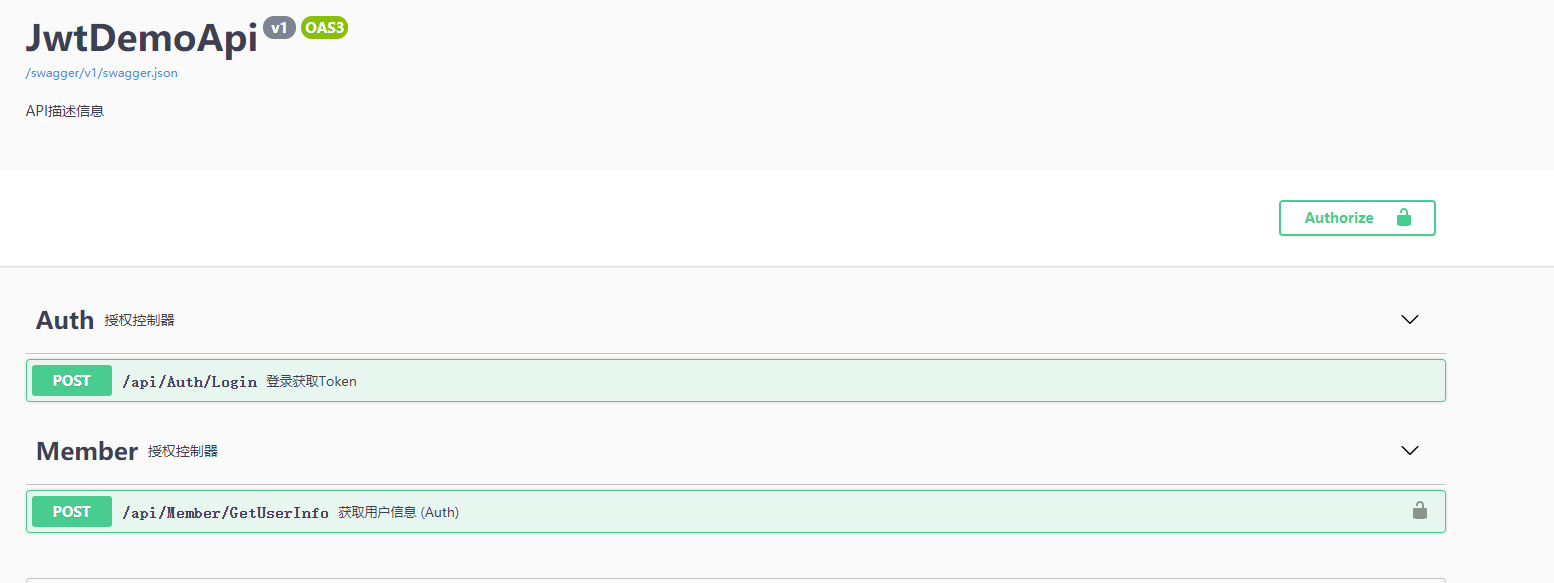
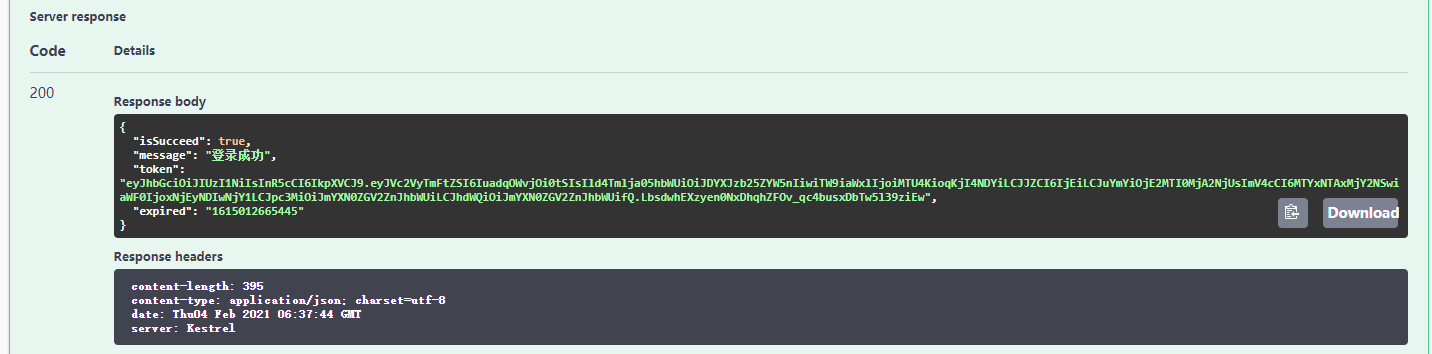
请求一下第一个接口:
直接请求第二个接口:提示401,认证失败

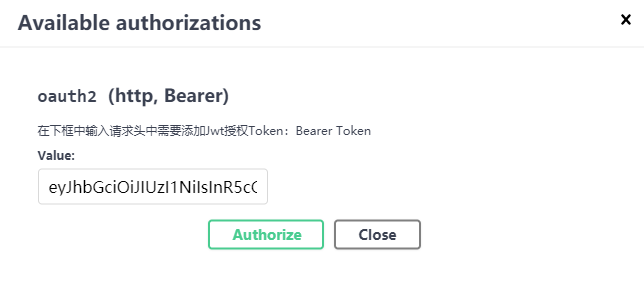
我们把登录接口返回的token加到右上角的授权里面去。
再来请求获取用户信息接口:已经成功了。
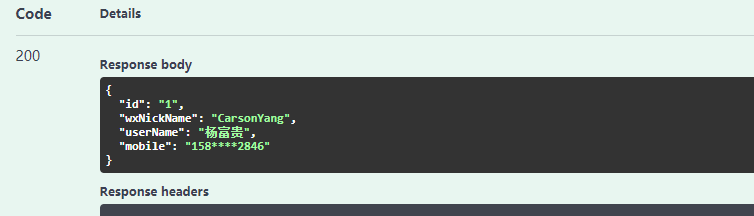
Token是无状态的,不需要存库。整个过程用的类比较多,实际上流程很简单,你可以把JWT理解为一个工具。














 川公网安备 51010702003150号
留下您的脚步
最近评论