
1、识别引擎的初始化,参见上一篇文章
.NET 利用PaddleOCRSharp实现OCR文字识别
2、PDF文件转图片,使用的O2S.Components.PDFRender4NET
封装一个辅助类PdfHelper.cs
 public class PdfHelper
    {
        /// <summary>
        /// 转换的图片清晰度,1最不清晰,10最清晰
        /// </summary>
        public enum Definition
        {
            One = 1, Two = 2, Three = 3, Four = 4, Five = 5, Six = 6, Seven = 7, Eight = 8, Nine = 9, Ten = 10
        }

        /// <summary>
        /// 将PDF文档转换为图片的方法
        /// </summary>
        /// <param name="pdfInputPath">PDF文件路径</param>
        /// <param name="imageOutputPath">图片输出路径</param>
        /// <param name="pageNum">第几页</param>
        /// <param name="imageFormat">设置所需图片格式</param>
        /// <param name="definition">设置图片的清晰度,数字越大越清晰</param>
        /// <returns></returns>
        public static (string FilePath, int MaxPage) ConvertPdf2Image(string pdfInputPath,
            string imageOutputPath,
            int pageNum,
            ImageFormat imageFormat, Definition definition = Definition.Ten)
        {
            string imageName = Path.GetFileNameWithoutExtension(pdfInputPath);

            PDFFile pdfFile = PDFFile.Open(pdfInputPath);
            string filepath = Path.Combine(imageOutputPath, imageName + pageNum + "." + imageFormat);
            if (File.Exists(filepath))
            {
                return (filepath, pdfFile.PageCount);
            }
            if (!Directory.Exists(imageOutputPath))
            {
                Directory.CreateDirectory(imageOutputPath);
            }
            if (pageNum <= 0)
            {
                pageNum = 1;
            }
            if (pageNum > pdfFile.PageCount)
            {
                pageNum = pdfFile.PageCount;
            }

            Bitmap pageImage = pdfFile.GetPageImage(pageNum - 1, 56 * (int)definition);
            int canKao = pageImage.Width > pageImage.Height ? pageImage.Height : pageImage.Width;
            int newHeight = canKao > 1080 ? pageImage.Height / 2 : pageImage.Height;
            int newWidth = canKao > 1080 ? pageImage.Width / 2 : pageImage.Width;
            Bitmap newPageImage = new Bitmap(newWidth, newHeight);
            Graphics g = Graphics.FromImage(newPageImage);
            g.InterpolationMode = System.Drawing.Drawing2D.InterpolationMode.HighQualityBicubic;
            g.DrawImage(pageImage, new Rectangle(0, 0, newWidth, newHeight),
                 new Rectangle(0, 40, pageImage.Width, pageImage.Height - 40), GraphicsUnit.Pixel);

            newPageImage.Save(filepath, imageFormat);
            g.Dispose();
            newPageImage.Dispose();
            pageImage.Dispose();
            pdfFile.Dispose();
            return (filepath, pdfFile.PageCount);
        }

        /// <summary>
        /// 将1个PDF文档所有页全部转换为图片
        /// </summary>
        /// <param name="pdfInputPath">PDF文件路径</param>
        /// <param name="imageOutputPath">图片输出路径</param>
        /// <param name="imageName">生成图片的名字</param>
        /// <param name="imageFormat">设置所需图片格式</param>
        /// <param name="definition">设置图片的清晰度,数字越大越清晰</param>
        /// <param name="merge">是否合并</param>
        public static void ConvertAllPdf2Images(string pdfInputPath, string imageOutputPath, string imageName, ImageFormat imageFormat, Definition definition, bool merge, decimal start, decimal end)
        {
            PDFFile pdfFile = PDFFile.Open(pdfInputPath);
            if (!Directory.Exists(imageOutputPath))
            {
                Directory.CreateDirectory(imageOutputPath);
            }
            int startPageNum = 1;
            int endPageNum = pdfFile.PageCount;
            if (merge && endPageNum > 25)
            {
                endPageNum = 25;
            }

            if (end > endPageNum)
            {
                end = endPageNum;
            }

            if (start > end)
            {
                return;
            }

            endPageNum = Convert.ToInt32(end);
            startPageNum = Convert.ToInt32(start);
            List<Bitmap> mpas = new List<Bitmap>();

            //  var bitMap = new Bitmap[endPageNum];
            for (int i = startPageNum; i <= endPageNum; i++)
            {
                try
                {
                    Bitmap pageImage = pdfFile.GetPageImage(i - 1, 56 * (int)definition);

                    int canKao = pageImage.Width > pageImage.Height ? pageImage.Height : pageImage.Width;
                    int newHeight = canKao > 1080 ? pageImage.Height / 2 : pageImage.Height;
                    int newWidth = canKao > 1080 ? pageImage.Width / 2 : pageImage.Width;
                    Bitmap newPageImage = new Bitmap(newWidth, newHeight);

                    Graphics g = Graphics.FromImage(newPageImage);
                    g.InterpolationMode = System.Drawing.Drawing2D.InterpolationMode.HighQualityBicubic;
                    g.DrawImage(pageImage, new Rectangle(0, 0, newWidth, newHeight),
                        new Rectangle(0, 40, pageImage.Width, pageImage.Height - 40), GraphicsUnit.Pixel);
                    if (merge)
                    {
                        mpas.Add(newPageImage);
                        g.Dispose();
                    }
                    else
                    {
                        newPageImage.Save(imageOutputPath + "\\" + imageName + i + "." + imageFormat,
                            imageFormat);
                        g.Dispose();
                        newPageImage.Dispose();
                        pageImage.Dispose();
                    }
                }
                catch
                {
                }
                finally
                {
                }
            }

            try
            {
                if (merge)
                {
                    //合并图片
                    MergerImg(mpas, imageOutputPath, imageName, imageFormat);
                }
            }
            catch (Exception ex)
            {

            }
            pdfFile.Dispose();
        }

        /// <summary>
        /// 合并图片
        /// </summary>
        /// <param name="maps"></param>
        /// <returns></returns>
        private static void MergerImg(List<Bitmap> maps, string imageOutputPath, string imageName, ImageFormat imageFormat)
        {
            int i = maps.Count;
            if (i == 0)
                throw new Exception("图片数不能够为0");
            //else if (i == 1)
            //    return ;

            //创建要显示的图片对象,根据参数的个数设置宽度
            int width = maps[0].Width;
            int height = 0;
            maps.ForEach(x => { height += width * x.Height / x.Width; });

            Bitmap backgroudImg = new Bitmap(width, height);
            Graphics g = Graphics.FromImage(backgroudImg);
            //清除画布,背景设置为白色
            g.Clear(System.Drawing.Color.White);
            int tempheight = 0;
            for (int j = 0; j < i; j++)
            {
                int thisheight = width * maps[j].Height / maps[j].Width;
                g.DrawImage(maps[j], 0, tempheight, width, thisheight);
                tempheight += thisheight;
            }
            //保存图片
            backgroudImg.Save(imageOutputPath + "\\" + imageName + "." + imageFormat, imageFormat);
            g.Dispose();
            return;
        }


    }
3、选择文件,获取指定页的图片,并进行识别
var ret = PdfHelper.ConvertPdf2Image(PdfFilePath,[图片保存地址], [页码], ImageFormat.Png);
OCRResult _ocrResult = OcrEngine.DetectText(ret.FilePath);
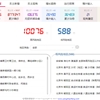
最终效果如下图

那么这个旋转是怎么实现的?
将pdf转图片之后,我们是把原图存下来的,因为转图片还是需要消耗时间的,如果图片存在就不会二次转换,
那么图片我们就可以旋转之后,覆盖原图,即不会损失大小,也不会太耦合
        /// <summary>
        /// 旋转
        /// </summary>
        /// <param name="left">是否向左旋转</param>
        /// <param name="savePath">旋转后图片保存位置</param>
        /// <returns></returns>
        private Bitmap RotateBitmap(bool left, string savePath)
        {
            Bitmap srcBitmap = new Bitmap(_filepath);
            int width = srcBitmap.Width;
            int height = srcBitmap.Height;

            Bitmap dstBitmap = new Bitmap(height, width, srcBitmap.PixelFormat);

            using (Graphics graphics = Graphics.FromImage(dstBitmap))
            {
                graphics.TranslateTransform((float)height / 2, (float)width / 2);
                graphics.RotateTransform((left ? -1 : 1) * 90);
                graphics.TranslateTransform(-(float)width / 2, -(float)height / 2);
                graphics.DrawImage(srcBitmap, new Point(0, 0));
            }
            srcBitmap?.Dispose();
            if (File.Exists(savePath))
            {
                File.Delete(savePath);
            }
            dstBitmap.Save(savePath, ImageFormat.Png);

            return dstBitmap;
        }
为啥要旋转,因为有些PDF中是扫描件,还是横版的,又不好看,又不太好识别。
旋转之后,再次调用识别,把识别结果标注在指定位置即可
















 川公网安备 51010702003150号
留下您的脚步
最近评论